Callbacks overview
What are callbacks?
Callbacks are a way to make one or more HTTP calls after an entering request reaches your route. This is useful to call other APIs or micro-services or to trigger a webhook.
Callbacks are fully configurable and are created at the environment level, like the data buckets.
Create a callback
To create a new callback, open the Callbacks options by clicking on the tab at the top of the window:

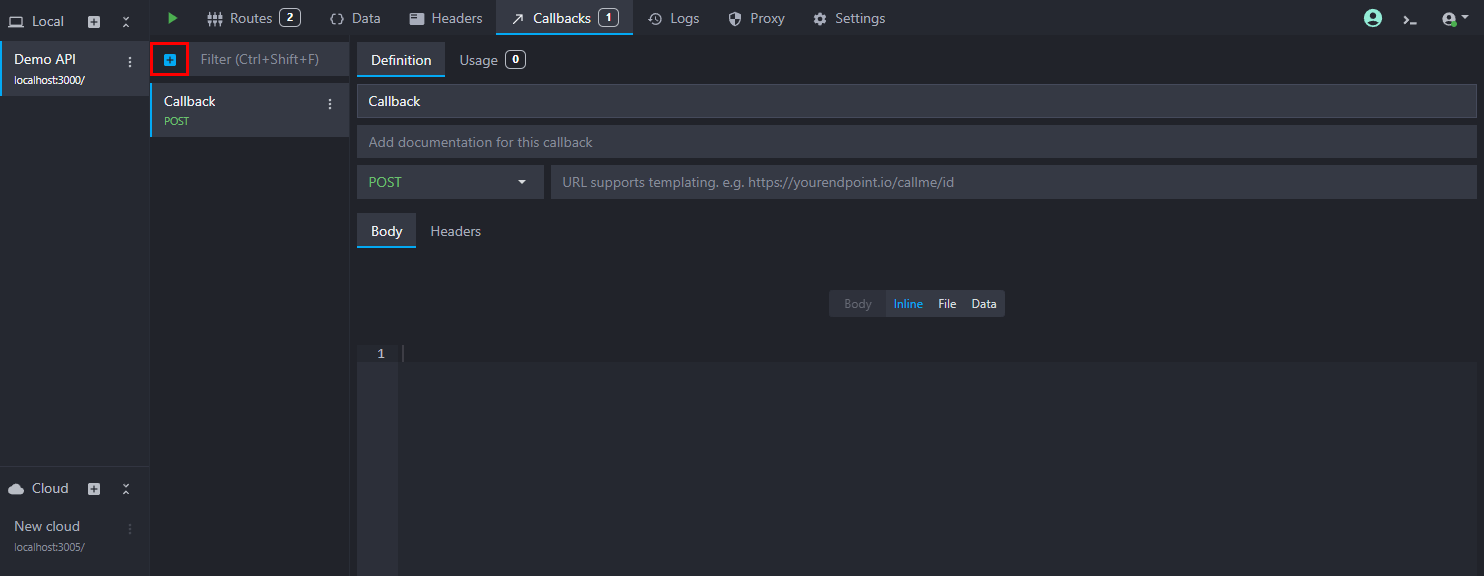
Add a new callback by clicking on the "plus" button:
Configure a callback
The callback configuration interface is very similar to the route response interface. You can configure the callback's name, description, method, URL, body, and headers:
- URL: the URL to call, either absolute (e.g.,
https://myapi.com/webhook) or relative (e.g.,/webhook). In the latter case, the base URL will be the hostname and port on which the API is running. When deploying with the CLI or Docker image, you can customize the base URL using the--public-base-urlflag. This field supports templating helpers. - Method: the HTTP method to use for the call. Only some methods support a body (
POST,PUT, andPATCH). - Body: the body to send with the call. You can serve an inline body, a file, or the content of a data bucket. They support templating too. Please refer to the response body documentation for more details.
- Headers: the headers to send with the call. They support our templating helpers.